
Understanding IPTV Mate and Its Core Features
Making the switch from traditional cable to digital streaming can feel overwhelming, but finding the right provider simplifies the entire process. IPTV Mate is designed for users who want a seamless, high-quality viewing experience without the technical hurdles often associated with internet television. At its core, the service delivers thousands of live channels, an extensive library of on-demand movies, and complete series directly to your television or smart device over your internet connection.
When you look at the clean, dark-mode digital interface on your screen, it becomes clear that this service prioritizes user experience. Navigating through the menus feels intuitive, mirroring the premium layout of major streaming applications you are already familiar with. Instead of clunky, outdated menus, you are presented with organized categories, clear movie posters, and live preview thumbnails. The platform is built to cater to both entertainment enthusiasts and casual viewers who simply want to turn on their TV and watch without frustration.
Beyond just the sheer volume of content, the infrastructure supporting the service sets it apart from budget providers. It relies on a global network of servers to ensure that the distance between your home network and the broadcast source is minimized. This fundamental technical foundation is what allows the service to deliver high-definition feeds, rapid channel switching, and a genuinely stable connection day in and day out.
Why It Ranks as the Best Premium IPTV Service
A premium service is defined by consistency, content organization, and customer support. IPTV Mate stands out as the best premium IPTV service because it addresses the most common complaints users have with budget alternatives: dead links, disorganized channel guides, and lack of technical assistance.
When you load the electronic program guide, the channels are accurately categorized by country, language, and genre. You do not have to scroll through hundreds of empty or duplicated feeds to find local news or prime-time entertainment. The on-demand library is regularly updated, meaning new releases and trending series are available shortly after broadcast. Furthermore, the provider actively maintains their channel lists, removing broken streams and updating sources behind the scenes so the viewer never notices an interruption.
For beginners, the availability of responsive customer support is a major advantage. If you encounter an issue setting up your device or managing your account, having access to real assistance transforms a frustrating technical problem into a quick, easy fix.
Exploring the Anti-Freezing IPTV Service Technology
Nothing ruins a movie night or a crucial game faster than a frozen screen. To combat this, the platform utilizes advanced anti-freezing IPTV service technology. While that sounds highly technical, it essentially means the provider uses load-balancing servers distributed worldwide.
In traditional streaming, if a thousand people try to watch the same popular event on a single server, that server overloads, causing everyone's video to stop and buffer. IPTV Mate avoids this by actively distributing viewer traffic across multiple high-capacity servers. If one server begins to experience heavy load, the system automatically redirects your connection to a faster, less congested server without you ever noticing.
This redundancy is the secret to uninterrupted viewing. It is highly recommended to pair this technology with a stable internet connection—preferably wired directly to your router via ethernet—to experience the true benefit of a buffer-free environment.
4K IPTV Subscription: Streaming Quality and Reliability
As televisions grow larger and more advanced, standard definition streams are no longer acceptable. A 4K IPTV subscription ensures you are getting the absolute most out of your modern home theater setup. IPTV Mate offers true high-definition and 4K streams for supported channels and on-demand content, delivering crisp textures, vibrant colors, and sharp text.
However, streaming in 4K requires a robust home network. To maintain a stable 4K feed, a minimum internet speed of 25 to 30 Mbps is highly recommended. If your household has multiple people streaming, gaming, or downloading simultaneously, you will want an even faster connection to prevent bandwidth throttling. For more detailed insights into evaluating uptime and finding a genuinely buffer-free IPTV provider, exploring proper setup methods is key.
When properly configured, the visual clarity rivals traditional satellite broadcasts. The movies in the on-demand section load with cinema-like quality, and live television broadcasts retain their crispness even on 65-inch or larger displays.
Why It Is the Best IPTV for Live Sports
Sports fans are often the most demanding streamers because live sports require perfect timing and smooth motion. A delay of even a few seconds can mean a ruined play via a push notification on your phone. IPTV Mate is widely considered the best IPTV for live sports due to its high-framerate streaming capabilities.
Many sports channels on the platform broadcast at 60 frames per second (fps). This high framerate removes the motion blur and visual stuttering that often plagues fast-paced sports like hockey, basketball, and motorsports. You see the puck, the ball, or the car clearly, exactly as the cameras captured it.
Additionally, the service provides comprehensive coverage of global sporting events. This includes access to premium sports networks, seasonal packages, and pay-per-view events without requiring expensive, single-event purchases. The categories are neatly organized before major events, allowing you to find the exact broadcast you want minutes before the game begins.
Mate IPTV Pricing, Plans, and Trials
Understanding the cost structure is vital before committing to any digital service. Mate IPTV pricing is designed to be straightforward, offering a tier system that rewards long-term commitments with substantial discounts. Unlike traditional cable companies, there are no hidden fees, hardware rental costs, or surprise installation charges. You pay exclusively for your digital access.
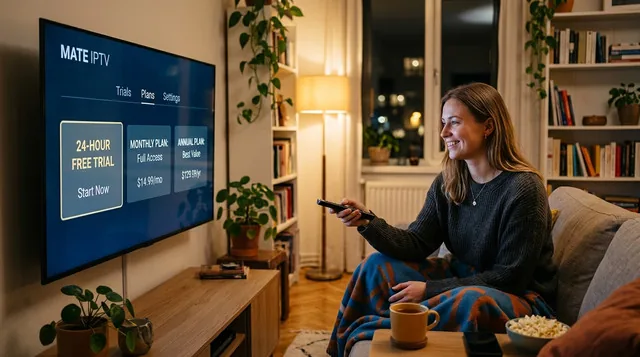
Looking at the pricing breakdown, the options range from a single month to a full calendar year. This flexibility allows users to test the waters before locking themselves into a longer commitment. The most popular approach for new users is to start small, verify that the service works well with their specific internet service provider and home devices, and then upgrade to a longer, more cost-effective plan.
How to Claim Your Mate IPTV Free Trial
Before spending any money, beginners should always test the service. Securing a Mate IPTV free trial is a straightforward process designed to give you temporary, full access to the platform.
To claim the trial, you typically need to visit the official website and navigate to the trial section. You will be asked to provide a basic email address to receive your temporary login credentials. Once you receive your username, password, and the server URL, you can immediately input them into your preferred streaming application and begin watching.
Maximizing the 24-Hour IPTV Trial Experience
A 24-hour IPTV trial is plenty of time to evaluate the service, provided you know exactly what to look for. Do not just turn it on and watch a single channel. You need to stress-test the system.
First, test the service during peak evening hours. Watch for framerate drops or audio sync issues. Finally, browse the video-on-demand section, load a 4K movie, and skip forward halfway through to see how fast the stream recovers and buffers. If the service performs well through these tests, it is a strong fit for your network.
Comparing Plans: From Mate IPTV 1 Month to Annual
Once your trial expires, you must choose a subscription tier. The Mate IPTV 1 month plan is the safest entry point. However, the annual Mate IPTV subscription drastically reduces the monthly breakdown cost and is the logical choice for maximizing savings.
How to Securely Buy Mate IPTV
When you are ready to buy Mate IPTV, the platform offers several secure payment gateways including standard credit/debit cards and cryptocurrency for added privacy. Activation is typically instant, with your credentials arriving in your inbox moments after the transaction clears.
Comprehensive Mate IPTV Setup Guide
Setting up digital streaming does not require a degree in computer science. This Mate IPTV setup guide covers the most popular devices used in living rooms today.
Step-by-Step: Mate IPTV for Firestick
The Amazon Firestick setup involves "sideloading" a reliable streaming player. Enable "Apps from Unknown Sources," install the "Downloader" app, and enter the download URL provided in your welcome email. Use the credentials from your subscription to log in.
Optimizing the Best IPTV for Android TV
For Android TV devices like Nvidia Shield or Google TV, simply search for established players in the Google Play Store. To optimize performance, ensure a 5GHz Wi-Fi network or ethernet connection.
Mate IPTV Smarters Pro Setup Instructions
The Mate IPTV Smarters Pro setup relies on the Xtream Codes API. Enter your credentials into the four fields (Name, Username, Password, URL) and click "Add User" to download your channel library. For a visual guide, see our complete Firestick setup walkthrough.
Accessing the Mate IPTV Web Player Without Apps
The Mate IPTV web player allows streaming directly through standard browsers like Chrome or Safari, perfect for watching on laptops without installing additional software.
The Mate IPTV Channel List and Viewing Experience
The Mate IPTV channel list features 25,000+ channels logically grouped for easy navigation.

Navigating Live TV and On-Demand Content
Switching between live broadcasts and on-demand content is seamless. The video-on-demand (VOD) section operates like major streaming platforms, with organized categories and IMDb ratings.
Mate IPTV Login Process and Device Management
Most subscriptions allow for a single connection. If you require multi-room viewing simultaneously, ensure you upgrade to a multi-connection plan to prevent stream interruptions.
How Does It Compare? Finding a Mate IPTV Alternative
While the service offers a premium experience, you may eventually want to explore a Mate IPTV alternative. Explore our guide to reliable IPTV alternatives in Europe for a thorough comparison.
Frequently Asked Questions
Do I need a VPN?
While not strictly necessary, a VPN is recommended to prevent ISP throttling and protect your digital privacy.
What is the minimum internet speed?
For 1080p and 4K streaming, a stable connection of 30 Mbps or higher is strongly recommended.