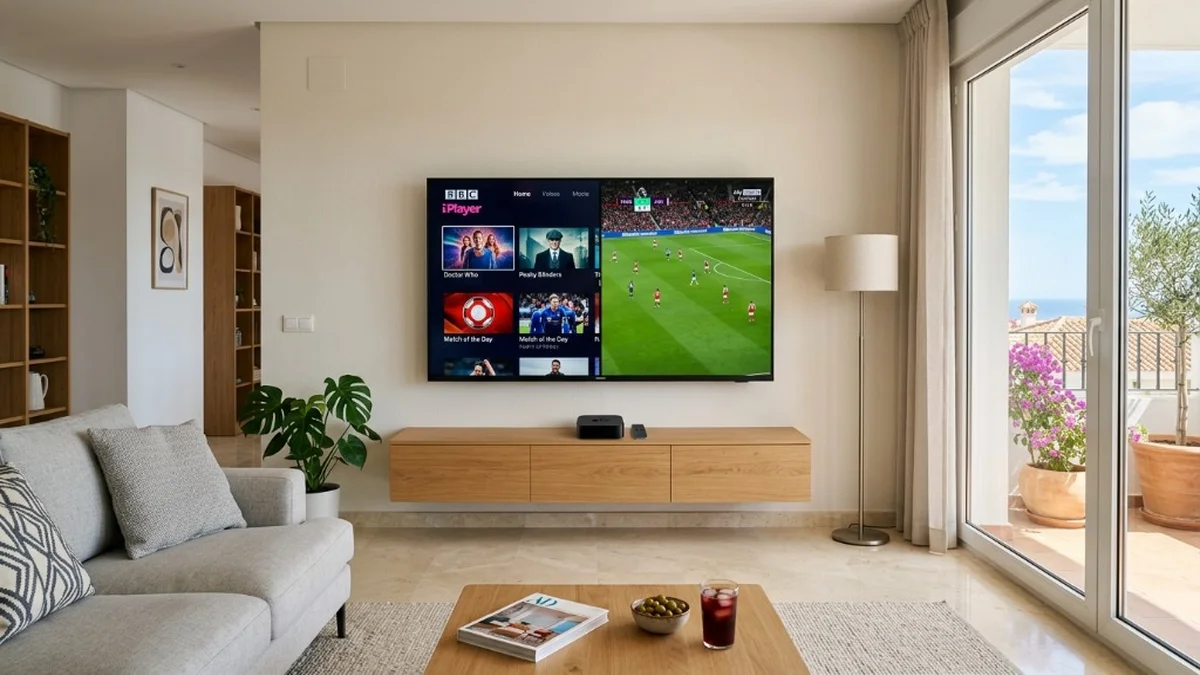
Finding the best Smart DNS for UK streaming apps in Spain is the cleanest way to unlock BBC iPlayer, ITVX, and Sky Sports on your Samsung, LG, or Apple TV without the speed penalty or battery drain of a VPN. Because Smart DNS reroutes only your location credentials while streaming directly from source CDNs, you get pristine 4K video. Here are the top providers, configuration steps, and critical pitfalls to avoid in 2026.
For British expats across Spain, staying connected with UK television is a daily priority. While geographic licensing blocks Spanish IP addresses, Smart DNS provides a lightweight workaround for televisions that cannot run encrypted VPN software.
Why Smart DNS Beats a VPN on Samsung, LG, and Apple TVs in Spain
When assessing Smart DNS vs VPN for streaming, the core advantages center on operating system compatibility and network throughput. While laptops and smartphones handle VPN clients with ease, living room displays face strict operating system limitations.
Samsung Smart TVs (Tizen OS) and LG Smart TVs (webOS) do not support consumer VPN apps in their Spanish app stores. Without Smart DNS, users face buying dedicated VPN routers or flashing firmware. In contrast, Smart DNS delivers a genuine hardware-free UK TV setup in Spain simply by altering your DNS address.
Although Apple TV introduced third-party VPN profiles in tvOS 17, Smart DNS maintains a vital edge. Traditional VPNs encrypt all network packets, causing a 15% to 30% reduction in raw connection speed. During high-stakes matches, this overhead frequently triggers Sky Sports Premier League buffering or stuttering when streaming live UK Sky Sports in 4K. Smart DNS provides a crucial zero-encryption speed advantage, preserving 100% of your Spanish fiber optic speed across providers like Movistar, Vodafone, Orange, and Digi.
Dual-Region Household Streaming
Smart DNS routes traffic on a per-domain basis. This means you can stream BBC iPlayer and ITVX from the UK simultaneously while other family members watch Spanish apps like RTVE Play or Movistar+ on the same television without changing settings.
Top 4 Providers: Choosing the Best Smart DNS for UK Streaming Apps in Spain
UK broadcasters actively detect and blacklist cloud hosting datacenter IP addresses that process heavy traffic. Finding the best Smart DNS for UK streaming apps in Spain requires selecting services that continuously rotate residential routing proxies and handle Spanish broadband quirks.
1. Smart DNS Proxy — Best All-Round Choice for Smart TVs
Smart DNS Proxy is an expat favorite that reliably bypasses the BBC iPlayer geo-block Spain alongside ITVX and Channel 4. Its native Dynamic DNS (DDNS) compatibility prevents drops when Spanish ISPs cycle your home IP. A 14-day free trial is available without credit card details.
2. Control D — Best for Granular Per-App Routing
Built by Windscribe, Control D offers customizable per-app routing rules. You can direct BBC iPlayer through London while keeping Spanish streaming apps local. It requires basic setup, but speed preservation and anti-blocking resilience are top-tier.
3. Unlocator — Established Unblocking Track Record
Unlocator has provided media unblocking for over a decade. Its Hybrid DNS resolves UK catch-up platforms smoothly and features a simple one-click dashboard for quick mobile IP re-authorizations when your Spanish router reboots.
4. NordVPN SmartDNS / SmartPlay — Best for Existing Nord Subscribers
Subscribers to NordVPN receive SmartDNS at no extra charge. Nord's SmartPlay technology embeds DNS proxy endpoints that can be manually entered on Samsung and LG displays. However, customization is minimal, and dynamic IP updates require manual web dashboard re-registration.
| Smart DNS Provider | Best For | BBC iPlayer / ITVX Success | Spanish Dynamic IP Support | Free Trial / Refund | Monthly Cost (Approx.) |
|---|---|---|---|---|---|
| Smart DNS Proxy | All-round Smart TVs | High (Dedicated UK routing) | Yes (DDNS supported) | 14-Day Free Trial | ~$5.00/mo |
| Control D | Granular per-app routing | High (Custom UK profiles) | Yes (CLI & DDNS) | 30-Day Money-Back | ~$4.00/mo |
| Unlocator | Veteran unblocking | Medium-High | Yes (One-click IP update) | 7-Day Free Trial | ~$4.95/mo |
| NordVPN SmartDNS | Existing Nord subscribers | Medium (Limited manual endpoints) | Basic (Static IP preferred) | 30-Day Money-Back | Bundled w/ VPN |
Step-by-Step Setup: Configuring Smart DNS on Apple TV, LG webOS, and Samsung Tizen
Configuring Smart DNS is completed directly on your streaming device in under five minutes without modifying your main fiber router. Here are the direct configuration instructions.
Step 1: Whitelist Your Spanish IP Address
Smart DNS identifies your authorized subscription via your public internet IP. Connect your smartphone or computer to your home Wi-Fi, log into your Smart DNS dashboard, and click "Validate IP". Because Spanish ISP dynamic IP whitelisting is required whenever your router IP changes, bookmark this dashboard page for fast access.
Step 2: LG Smart TV (webOS) Setup
Apply these LG webOS manual DNS settings using your Magic Remote:
- Open Settings > All Settings > Network.
- Select your active network (Wi-Fi Connection or Wired Connection / Ethernet).
- Select Advanced Wi-Fi Settings (or Edit on recent webOS releases).
- Uncheck "Set Automatically".
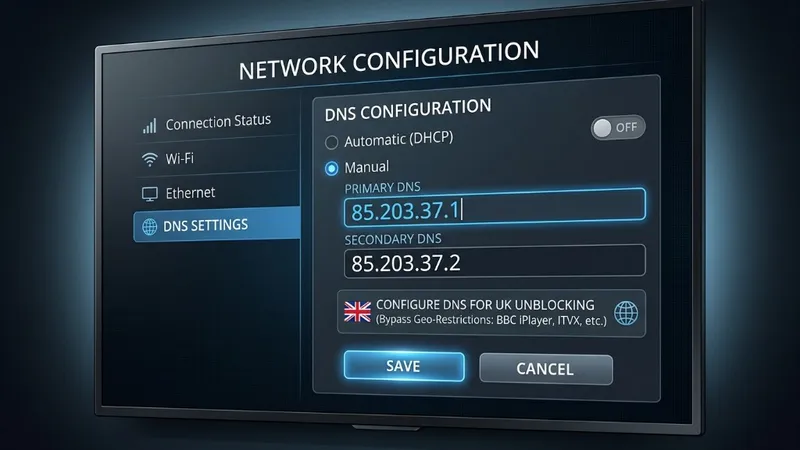
- Select the DNS Server field, input your provider's UK DNS address (e.g.,
85.203.37.1), click Connect, and restart your TV.
Step 3: Samsung Smart TV (Tizen OS) Setup
Follow these steps to unblock BBC iPlayer on Samsung Smart TV in Spain:
- Press Home and open Settings > General > Network.
- Select Network Status, then click IP Settings.
- Change DNS Setting from Get automatically to "Enter manually".
- Enter your assigned primary UK DNS numbers into the DNS Server box and tap OK.
- Turn off your TV and unplug the power cable for 20 seconds to clear residual DNS cache.
Step 4: Apple TV (tvOS) Setup
To execute an Apple TV configure DNS manual update:
- Open Settings > Network and select your Wi-Fi or Ethernet connection.
- Scroll to Configure DNS and change from Automatic to Manual.
- Type your provider's UK DNS address, click Done, and restart your Apple TV.
Crucial Step: Television Country Code Region Switch
Smart DNS resolves streaming video, but it does not change your TV's regional app store. If your television was purchased in Spain, you must carry out a Samsung Tizen change country code or switch your LG Service Country to the United Kingdom to download BBC iPlayer and ITVX. For comprehensive hardware steps, consult our complete guide on getting UK TV in Spain on a Smart TV.
The Catch: Why Smart DNS Often Fails in Spain (And Better Alternatives)
Despite its lightweight appeal, Smart DNS frequently runs into operational roadblocks in Spain that can disrupt weekend viewing.
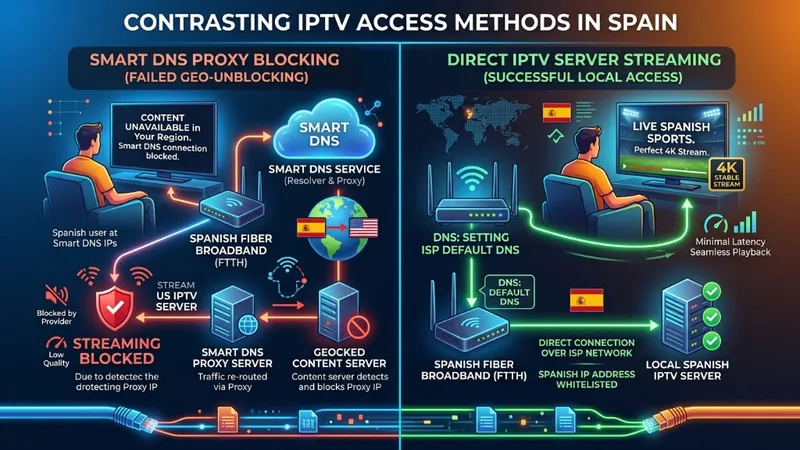
The main obstacle is Spanish ISP infrastructure. Providers like Movistar, Vodafone, and Orange rotate dynamic IP leases often. Additionally, providers like Digi Spain and MásMóvil use Carrier-Grade NAT (CGNAT), pooling households behind shared IPs. When your public IP cycles, your Smart DNS service unauthorizes your TV, causing playback errors until manually re-validated.
Concurrently, UK broadcasters continuously blacklist datacenter IP pools. Automated sweeps frequently interrupt ITVX live streaming abroad and Sky Sports feeds during peak live matches.
This explains why many expats in 2026 choose dedicated European IPTV services like IPTV Mate EU. Instead of navigating regional store locks, manual DNS configurations, and IP validation checks, a premium IPTV provider streams the entire comprehensive UK channel and sports lineup directly to player apps like IBO Player, IPTV Smarters, and TiviMate.
Streams bypass broadcaster proxy detection completely, delivering reliable live BBC, ITV, Channel 4, and Sky Sports without geo-error screens. To explore network privacy considerations, read whether you need a VPN for IPTV to avoid ISP throttling or view our step-by-step Smart TV IPTV setup.
Frequently Asked Questions
Can I watch BBC iPlayer on a Spanish Samsung or LG TV without changing the TV region?
No. Even if your Smart DNS successfully reroutes network queries, Samsung Tizen OS and LG webOS app stores only display region-specific apps tied to your television's service country. You must switch your TV service country code to the United Kingdom to download BBC iPlayer, ITVX, and Channel 4 from the app store before Smart DNS can resolve playback.
Why does my Smart DNS stop working when my Spanish router resets?
Spanish ISPs like Movistar, Vodafone, and Orange assign a new public IP whenever your router reboots. Because Smart DNS authenticates via your whitelisted IP address, changes trigger authorization failures until you update your registered IP on your provider dashboard.
Does Smart DNS slow down my streaming speed for 4K live sports?
No. Unlike a VPN which encrypts every packet and introduces a 15% to 30% speed penalty, Smart DNS applies zero encryption overhead. It only reroutes lightweight DNS hostname lookups to UK servers while the heavy video feed streams directly from broadcaster content delivery networks at full fiber broadband speed.
What should I do if BBC iPlayer detects my Smart DNS proxy?
If BBC iPlayer displays a proxy or location error, first confirm that your current Spanish IP address is validated on your provider dashboard. Next, clear your Smart TV app cache and reboot the television. If the block continues, switch to an alternative secondary UK DNS address provided by your service, or submit a re-routing ticket to bypass broadcaster server blacklists.
Is Smart DNS or an IPTV subscription better for watching UK TV in Spain?
Smart DNS is ideal if you strictly want on-demand catch-up apps and already have UK TV accounts, provided you do not mind manual DNS troubleshooting and app store region switches. A dedicated European IPTV service is vastly superior for live viewing, offering live BBC, ITV, and full Sky Sports channels in 4K with instant plug-and-play apps and zero IP re-validation headaches.
Final Verdict: What Is the Best Choice for Expats in 2026?
Configuring the best Smart DNS for UK streaming apps in Spain gives you a fast, hardware-free path to access catch-up television on Samsung, LG, and Apple TV displays. Top services like Smart DNS Proxy and Control D eliminate the 20% speed drop associated with encrypted tunnels. Nevertheless, routine Spanish dynamic IP updates, CGNAT obstacles, and periodic broadcaster proxy blacklists mean that Smart DNS can require ongoing manual maintenance.
For viewers who want instant, reliable British television with no app store region tricks or DNS re-validation routines, a specialized European IPTV subscription represents the ultimate stress-free alternative. Enjoy full electronic program guides, 4K picture quality, and buffer-free live sports by requesting an instant 24-hour IPTV free trial today.